Juicy16
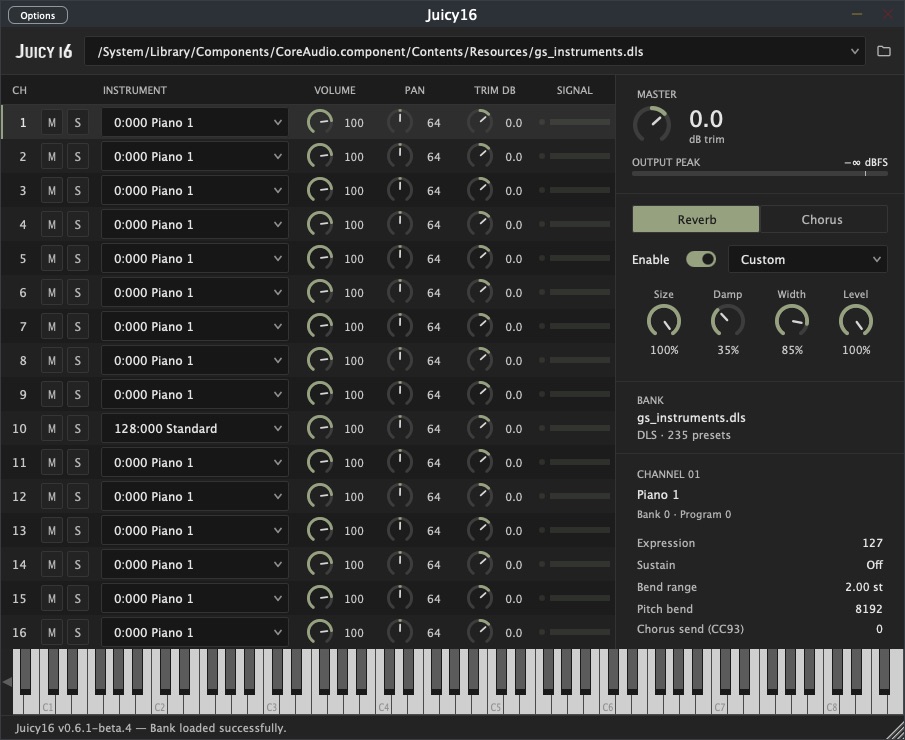
A free DLS and SoundFont plugin for Mac and Windows. I made Juicy16 to play game MIDI in my DAW, much like Fruity LSD. Load the sound bank that goes with your MIDI and each channel gets its own instrument.
Download 1.0.0-beta.1
macOS 11+ · Apple Silicon · AU and VST3
1.0.0-beta.1 · 6.6 MB
Apple Silicon only. If macOS blocks the installer, the setup guide explains how to open it.
Windows x64
Windows 10+ · 64-bit · VST3
1.0.0-beta.1 · 7.6 MB
The installer includes the plugin and a standalone player. Use the portable ZIP below if you prefer to install it yourself.
How it works
Juicy16 loads DLS, SF2 and SF3 banks. Your MIDI file picks the instruments for all 16 channels, and you can adjust their volume, pan, mute and solo in the plugin.
Everything comes out as one stereo mix, with reverb and chorus if you want them. You’ll need your own sound banks and a DAW to play the MIDI.
This update improves stereo DLS panning and fixes some silent drum kits. There’s also an interpolation setting for changing how samples sound when pitched up or down.
Getting started
- Run the Windows installer, or unzip the Mac download and open
install_macos.command. Restart your DAW and rescan plugins if Juicy16 doesn’t appear. - Add Juicy16 as an instrument and load your DLS, SF2 or SF3 bank.
- Route your MIDI to it, keeping the original channels, and play from the beginning so the instrument changes are picked up.
Need help installing? Windows instructions · Mac instructions
Still in beta
Keep a backup of your project while trying it out. Older versions of Juicy16 can’t open projects saved with this version. If something goes wrong, let me know below.
Found a bug?
Tell me which DAW you’re using, what happened and how I can try it myself.
Report sent. I’ll follow up by email if I need more.